Personizelypersonizely.net

Personizely changelog

New features, improvements and fixes in Personizely, the Shopify experimentation platform.

October 2026

Improvement

Redirect the control group too in URL split tests

A new setting for redirect campaigns sends visitors in the control group through the same redirect as the variations. Use it when you want every group to have the same page-load behavior, so redirect timing does not skew results.

  • Experiments

September 2026

Improvement

Smaller improvements and fixes in August and September

  • Campaign list: filter by deployed campaigns, and long names no longer break the layout.
  • Product campaigns cannot be started until their price selectors are configured, and the editor links to the docs for CSS selectors.
  • Fixes: first visit and first session targeting on Shopify, tracking for shipping experiments, form submits in product clone campaigns, and templates that load with a delay.
Improvement

Personizely now works on your phone

Personizely now works on your phone

The Personizely app was barely usable on a phone. It is now fully responsive, so you can check results and manage your account from anywhere:

  • Analytics and reports: dashboards, campaign and widget reports, experiment results and filters.
  • Lists and settings: campaigns, widgets, targets and all account and website settings.

The widget builder and the visual campaign editor still need a bigger screen, so they stay desktop only.

  • App
Improvement

URL split tests across subdomains

URL split campaigns now work when the original page and the variations live on different subdomains of the same site, for example www.example.com and shop.example.com. Before, a visitor redirected to another subdomain could be counted as a new visitor and placed in a different group. Now they keep their assigned variation and are counted once.

This does not cover completely different domains, for example example.com and example-shop.com. Browsers keep their data separate, so visitors may still be assigned again on the other domain.

  • Experiments

July 2026

Improvement

Smaller improvements and fixes in June and July

  • More reliable Shopify tracking. Events now go through Personizely's own host first and fall back to Shopify's proxy, which was slow and caused missed events. Bot detection also runs inside the Shopify web pixel, and we removed a check that wrongly flagged visitors using in-app browsers like Facebook's.
  • More accurate significance for revenue per visitor, with improved statistical calculations for revenue-based experiments.
  • Purchase events include location and device data, so orders can be broken down by country and device.
  • Goals: add many products to a purchase goal at once, and page goals can now match query strings.
  • Wix: support for the Wix product catalog V3.
  • Shipping experiments: a clearer setup wizard and several fixes for derived rates and URLs with parameters.
  • Billing: view your subscription details, add a coupon, and add a payment method when a plan change fails.
  • Campaign builder: the cart now works while editing campaigns with the Chrome extension.
  • Faster reports after a round of database and query optimizations.
Improvement

Split experiment traffic evenly in one click

Split experiment traffic evenly in one click

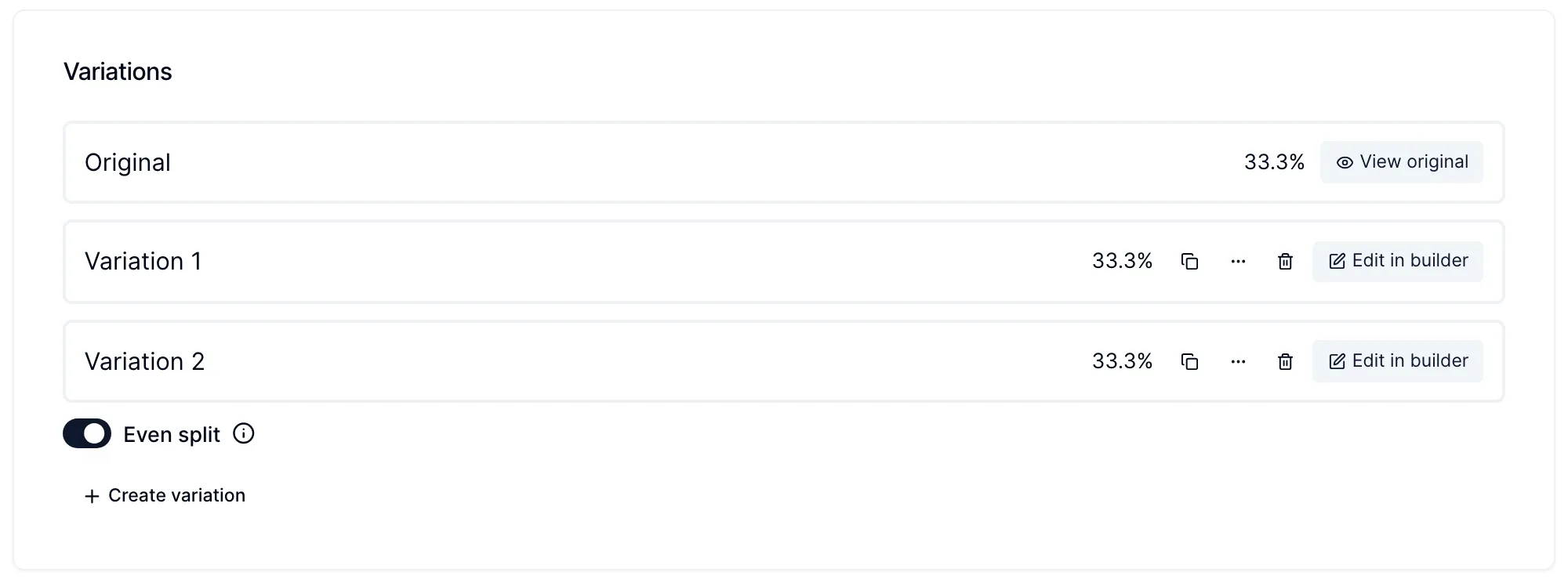
Experiments have a new Even split switch that divides traffic equally between the control group and every variation. Whole percentages cannot split traffic evenly three, six or seven ways (33% + 33% + 34% is not even), so with the switch on each group gets exactly the same share.

You will find it next to the variations in campaign experiments, in widget experiments and when you create a new experiment. While it is on, the individual percentages are locked and show the equal share (for example 33.3%). Add or remove a variation and the split adjusts automatically. Turn it off to set the shares by hand again.

The switch can be changed until the campaign is deployed.

  • Experiments
Improvement

Goal conversion rate now counts visitors, not hits

Goal conversion rate is now calculated the same way everywhere: visitors who reached a goal at least once, divided by the visitors the widget or campaign reached.

Before, widget reports divided the total number of goal hits by the number of views. A visitor who saw a popup three times and clicked twice counted as three views and two goal hits, which made rates swing with how often a widget was shown and how many times people clicked. Campaigns already used visitors, so the two kinds of reports did not compare.

What changed

  • One definition. Widgets, widget experiments and campaigns all use visitors with goal hits divided by reach (unique visitors).
  • More reliable winners. Confidence in widget experiments is now calculated on unique visitors, so one enthusiastic visitor can't tip a test.
  • Both numbers are still there. Reports show Visitors with goal hits and Total goal hits side by side. Hover over a goal count to see both.
  • Consistent names. Widget experiment metrics now use the same names as campaigns, Conversion rate, Goal conversion rate and Revenue per visitor, in the app, in exports and in the API.

What you might notice

Goal conversion rates for widgets will look different from before, usually lower if visitors trigger goals repeatedly, or higher if your widgets are shown many times per visitor. The new numbers are the ones to compare across widgets and campaigns. Your data has not changed, only how it is summarized.

  • Analytics
  • Widgets
  • Experiments
Improvement

Filter out bots and abusive traffic automatically

Filter out bots and abusive traffic automatically

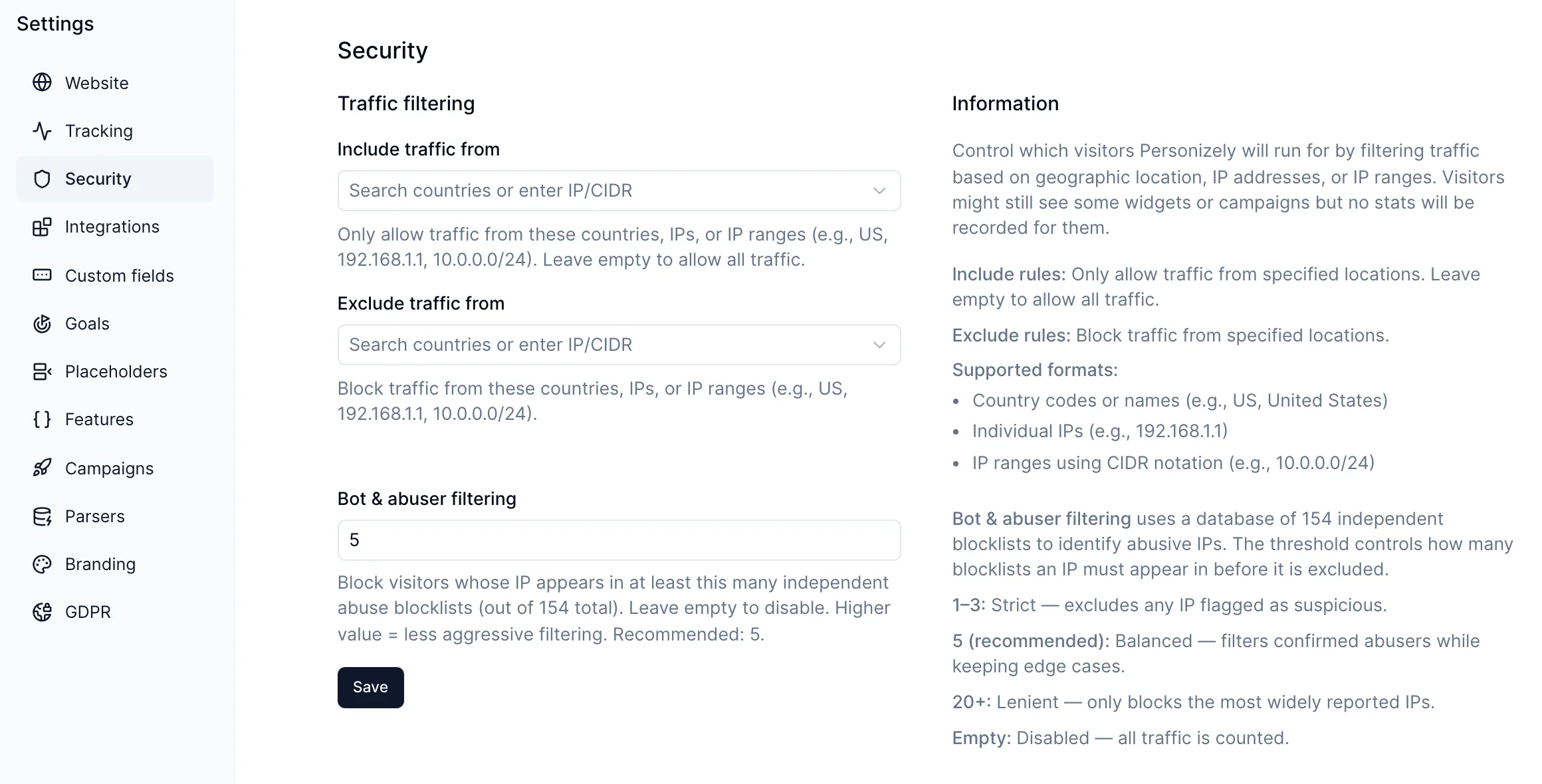
You can now filter out visitors whose IP address is known for abuse, such as scrapers, click bots and spam networks, so they no longer count toward your visitors, conversion rates or experiment results.

How to turn it on

Go to Settings > Security and set Bot & abuser filtering to a number. A visitor is filtered out when their IP appears on at least that many independent abuse blocklists, out of 154 that we check.

  • 1 to 3 is strict: any IP flagged as suspicious is excluded.
  • 5 is the recommended starting point. It filters confirmed abusers while keeping edge cases.
  • 20 or more is lenient and only filters the most widely reported addresses.
  • Empty turns filtering off, which is the default.

Filtered visitors are not recorded in your stats. They might still see some widgets or campaigns.

This works alongside the country and IP rules in the same settings page, which let you allow or block specific traffic yourself.

Filtering applies from the moment you save; past data is not changed.

  • Analytics
  • App

June 2026

Improvement

Test prices for products that have subscriptions or bundles

You can now a/b test product prices for products that have bundles and subscriptions. This is possible by creating duplicate products and a URL split mechanism to make sure that for each product, a visitor sees the subscriptions or the bundles assigned to it.

Note that you have to configure a subscription or bundle for each of the products individually, in case you want them to be specific to that variation.

Also, make sure to swap the variation products in case you are planning to delete the campaign, so that the customers can keep their subscription running.

April 2026

Improvement

Minor improvements

During the past weeks we've shipped several quality of life improvements.

Widget report export - You can now export the general widgets stats like views, conversions, goal hits, etc. using a button at the top of the widget report.

Order history targeting - You can now target visitors based on past orders that have specific tags.

Theme experiment alerts - We'll now show the missing templates when running a theme experiment - so if the variant theme doesn't have some templates that are present in the original theme - you'll get a warning so you can make sure that your site looks right on all variations.

January 2026

Improvement

Cart Progress Bar Element

Cart Progress Bar Element

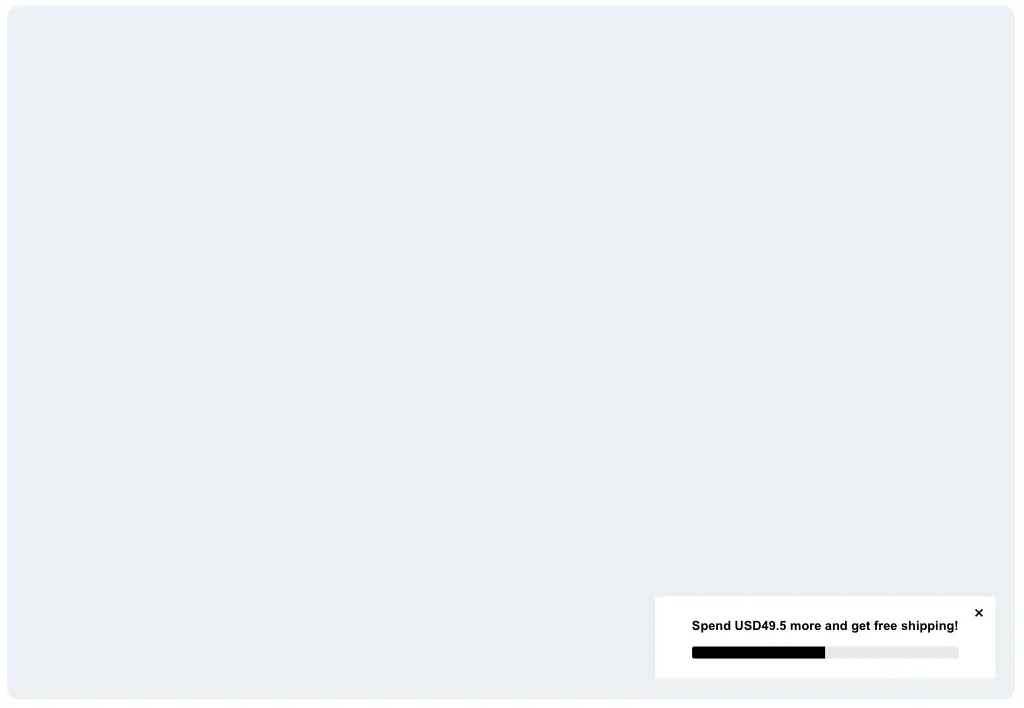
The cart progress widget now includes a visual progress bar component. Previously, cart progress only showed text messaging (e.g., "Add $20 more for free shipping"). Now you can add a progress bar that fills up as customers get closer to their goal, giving visitors a visual incentive to increase their cart value.

Improvement

Shopify Hydrogen Support

Personizely now officially supports Shopify Hydrogen headless storefronts. Our new React package (@personizely/shopify-hydrogen) provides PersonizelyProvider component for easy integration, hooks for cart and checkout interception, and full compatibility with Hydrogen server-side rendering.

November 2025

Improvement

WCAG compatibility for widgets

We've upgraded our widgets to be WCAG compatible. This means that Personizely follows all the guidelines in widgets by using the appropriate element types, labels, aria attributes and other WCAG-related items.

Learn more about WCAG

September 2025

Improvement

Native Shopify ecommerce events

Personizely now automatically tracks "Add to Cart" and "Checkout Started" events out of the box. You can also filter these out by product.

This unlocks better targeting and more accurate goal attribution for your e-commerce A/B tests and personalization campaigns — no extra setup required.

Besides that, we also shipped a Shiprocket Integration, enabling you to measure pre and post-purchase goals more effectively when using their fulfillment and checkout flows.

👉 GoKwik support is coming soon as well.

April 2025

Improvement

Time trigger enhancement

Time trigger enhancement

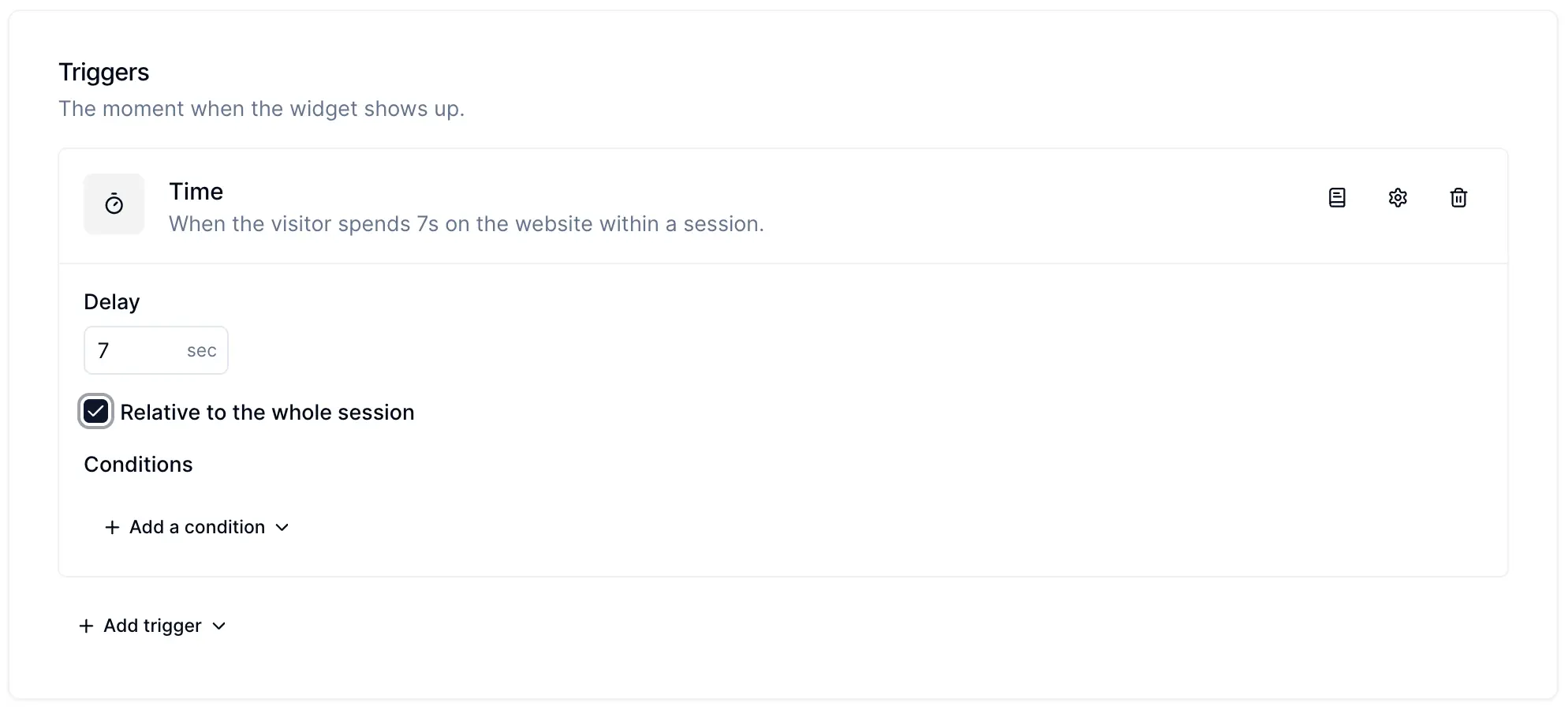
A little neat enhancement arrived for the time trigger. Now you can choose a time trigger to fire a widget based on the duration of the whole session, whereas previously it was based on the time spent in a single pageview. By default this option will remain unchecked on all current widgets.

March 2025

Improvement

Product price experimentation and enhanced profit analytics

Product price experimentation and enhanced profit analytics

At Personizely we've always strived to build products that impact our customer's bottom line. At various stages we've built products that helped with opt-in conversion rate (list building widgets), checkout conversion rate (cart abandonment widgets), average order value (cross-sell widgets), and revenue (a/b testing, personalization, and offer widgets).

Today we are stepping into a new era - profit optimization, because in the end what any business business really cares about in the end is the profit, and it's the highest potential impact lever a business can pull to completely change its trajectory.

That's why today we are announcing a set of tools oriented to help you pull these levers.

Product pricing experiments (Shopify Plus only)

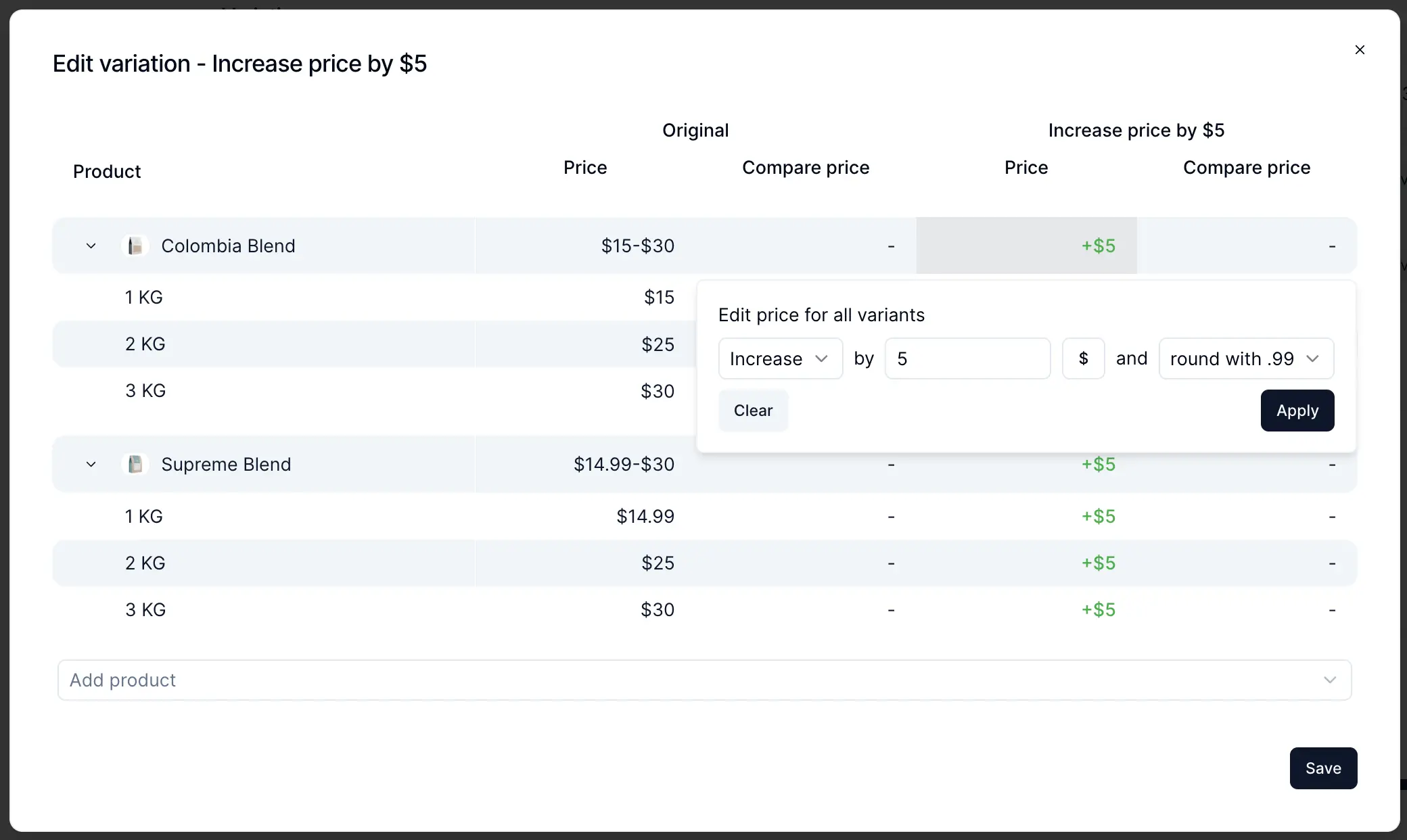
A new type of campaign landed in Personizely enabling you to create product pricing experiments that run smoothly in both your storefront and the checkout. Price adjustments can work on both product and variant levels, and you can set up dynamic adjustments based on the product's existing prices.

How it works

Personizely uses preconfigured selectors to adjust the prices dynamically in the storefront, without any flicker (thanks to our leading technology). For cart and checkout, Personizely uses cart transform functions (sadly only available for Shopify Plus now) which allow seamless price adjustments at any level.

Head to our docs to learn more about how it works and how to configure it - docs.

New purchase goal (Shopify only for now)

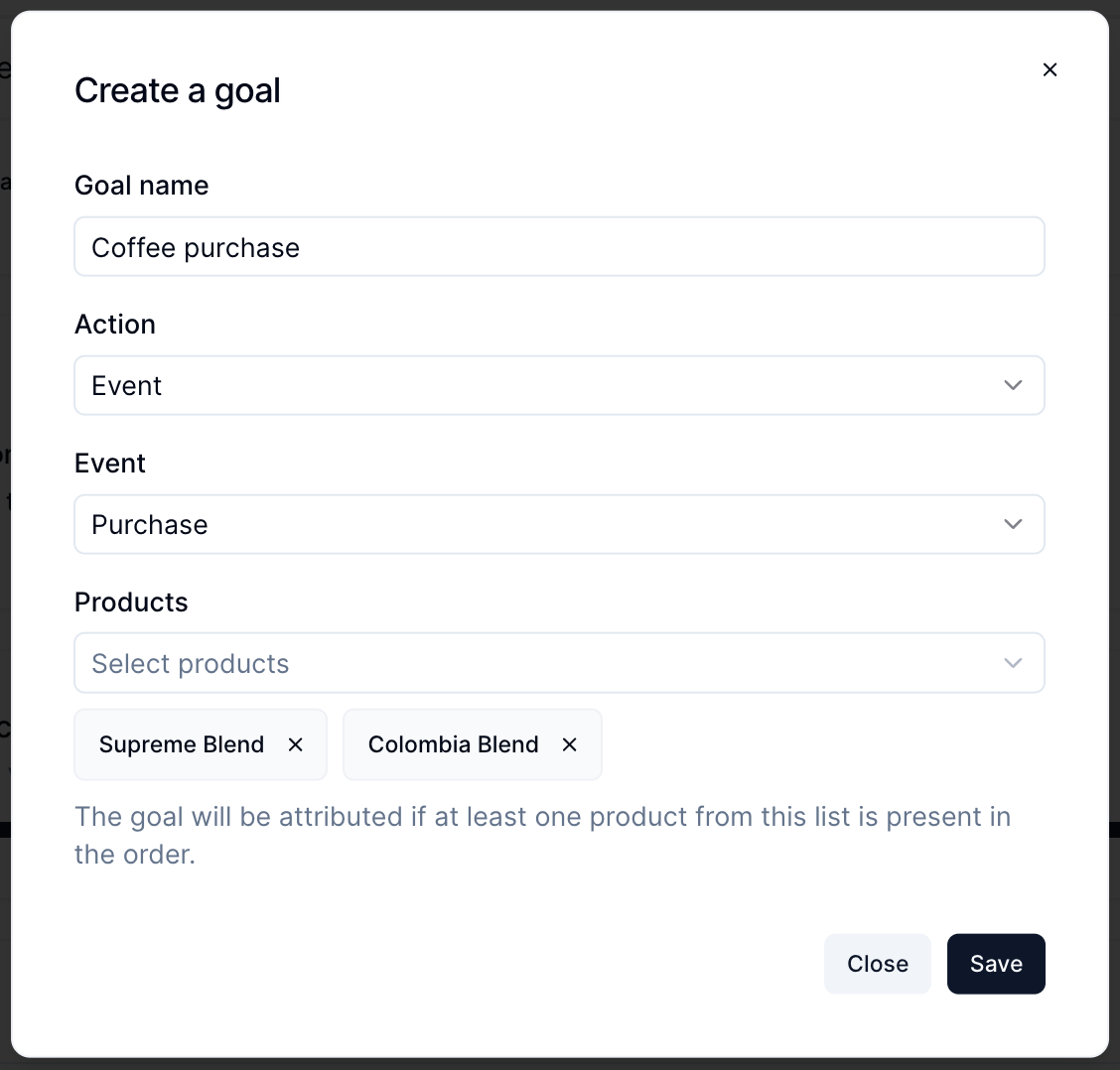
You can now create custom purchase event goals for specific sets of products, allowing you to track the performance of product experiments (and other types of experiments) on a per-product basis, giving your data more precision and granularity.
Improved profit analytics

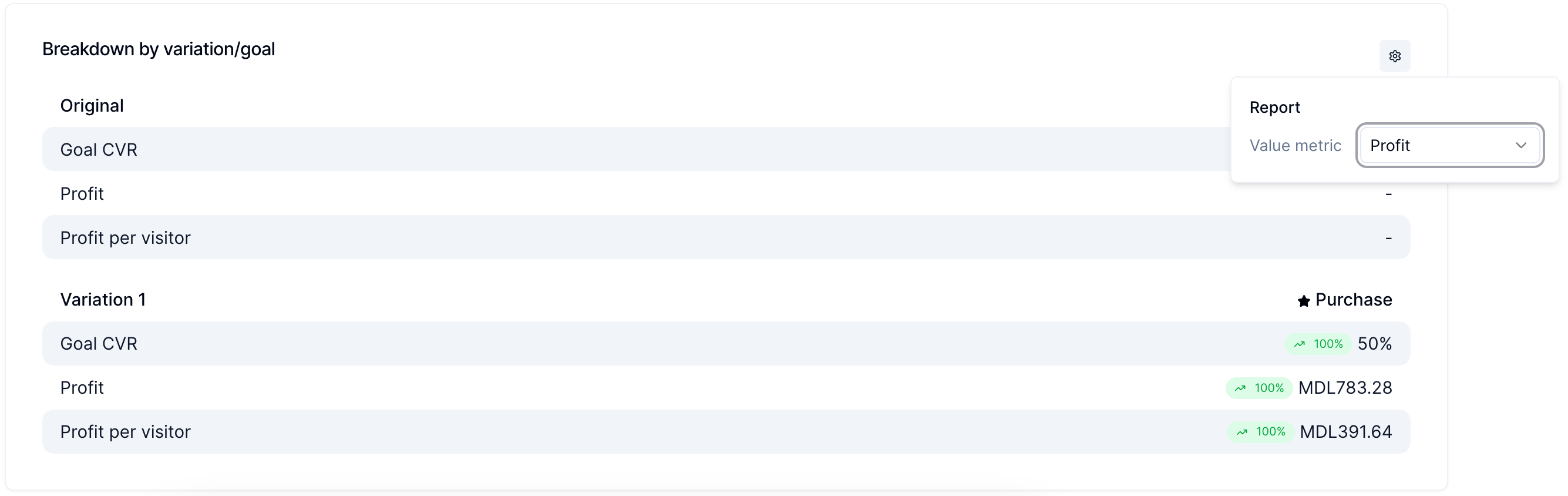
When you enable profit tracking you will be able to configure which value metric you track in your reports - it can be Profit or Revenue (or Extra revenue for cross-sell widgets). This allows you to dig deeper into how your experiments actually impact the most important metrics.
Market targeting

We've built a new targeting filter allowing you to target campaigns and widgets by market, which is useful if you want to run price experiments that are sandboxed to a single market.

With that, we are taking another step into making Personizely the ultimate revenue profit optimization toolkit, but we're not stopping there ;-)!

Let us know what you think!
November 2023

Improvement

Multiple field type

Multiple field type

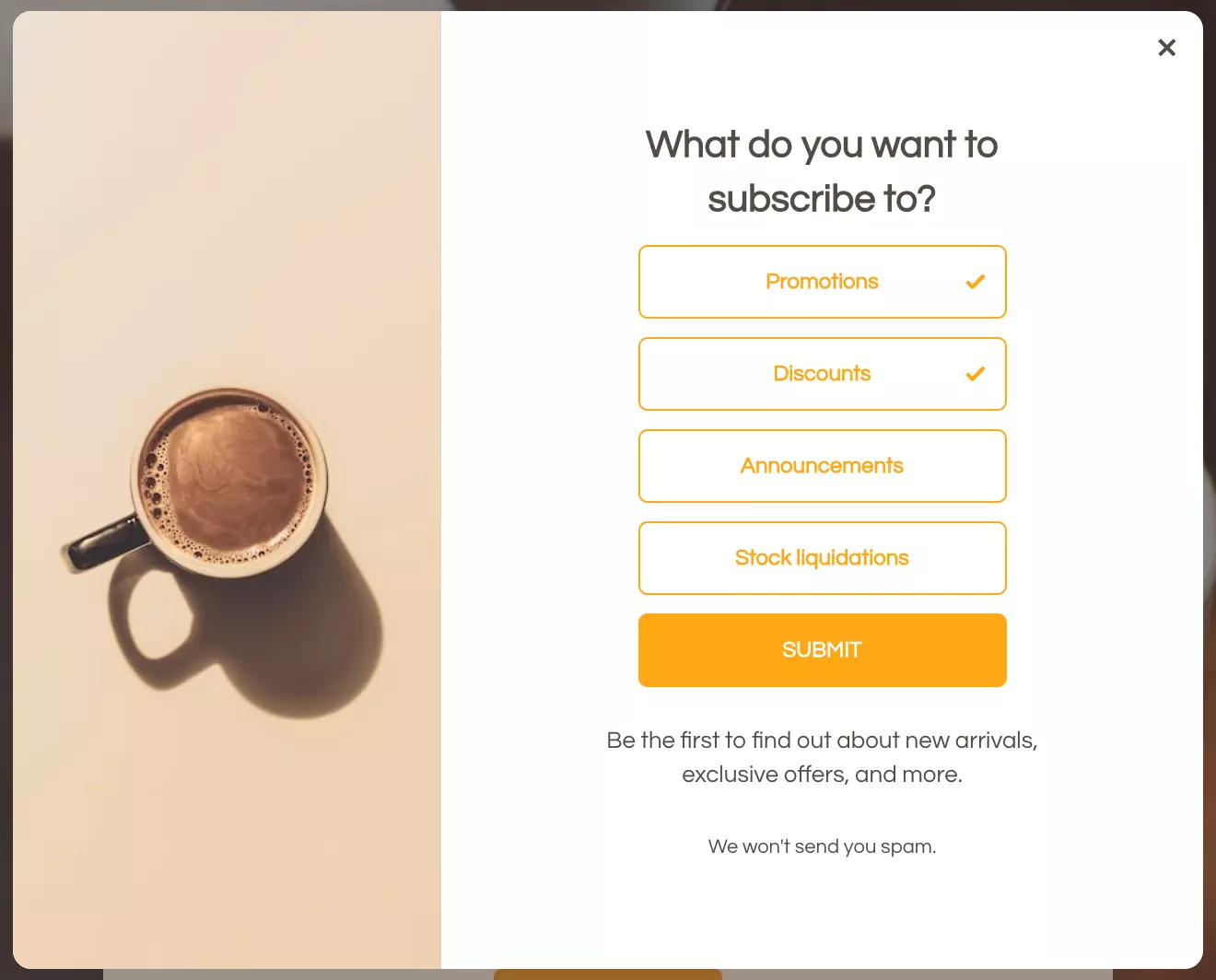
A new field type was added to Personizely. You can now use multiple type fields in your widget forms and surveys. You can create any amount of them for things like preferences, subscription options, or interests.

These fields are later passed to any integration provider you use, as a multiple field if the integration supports it or as a comma-separated values text if it doesn't.

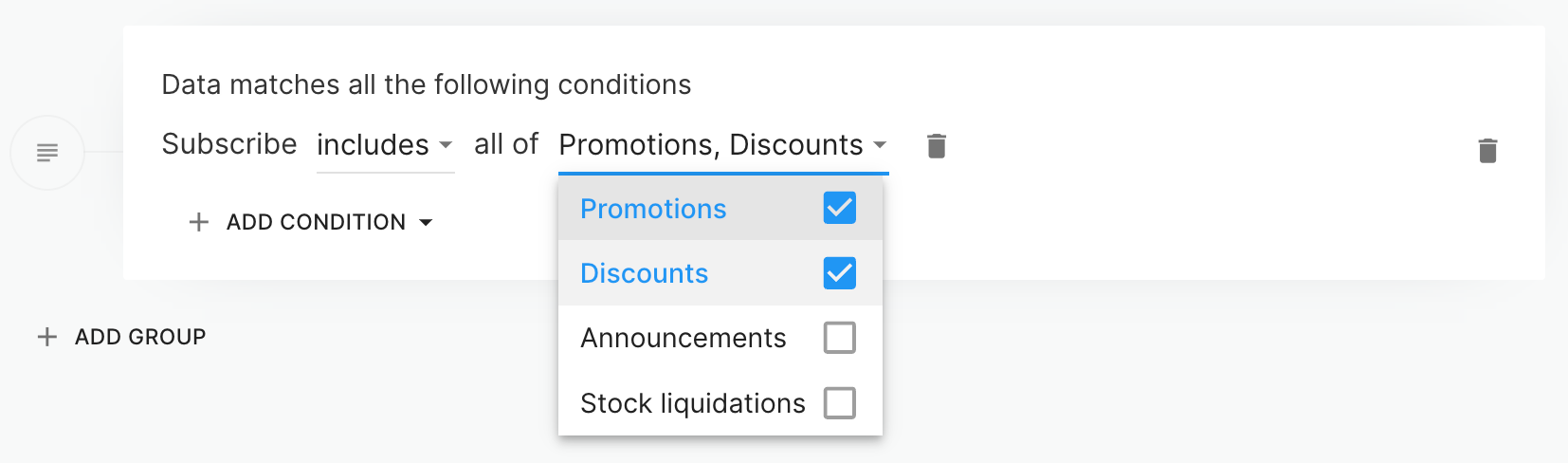
You can also use the data collected via these fields in your targeting.

Improvement

Revenue per visitor metric in campaign analytics

Revenue per visitor metric in campaign analytics

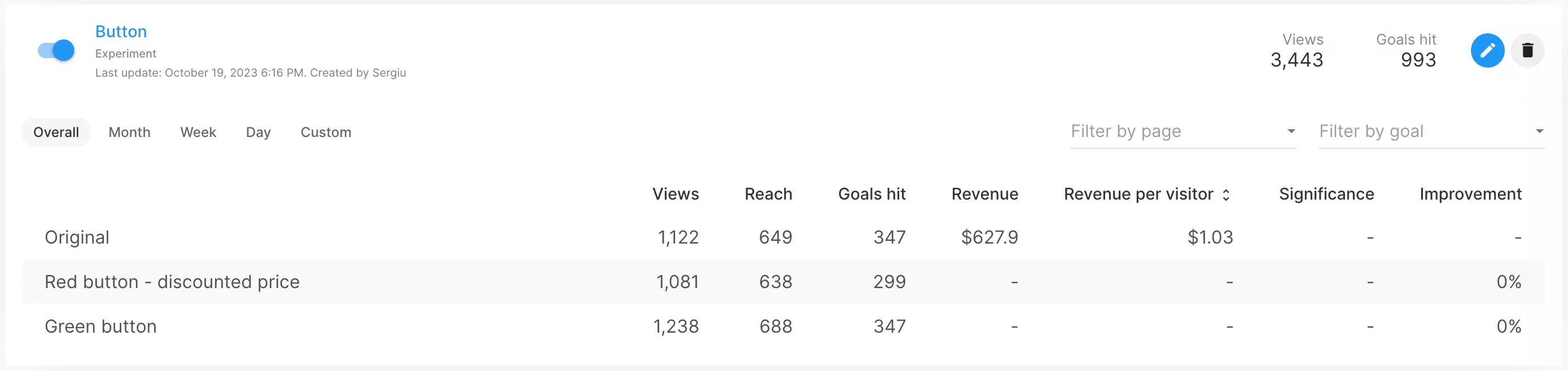
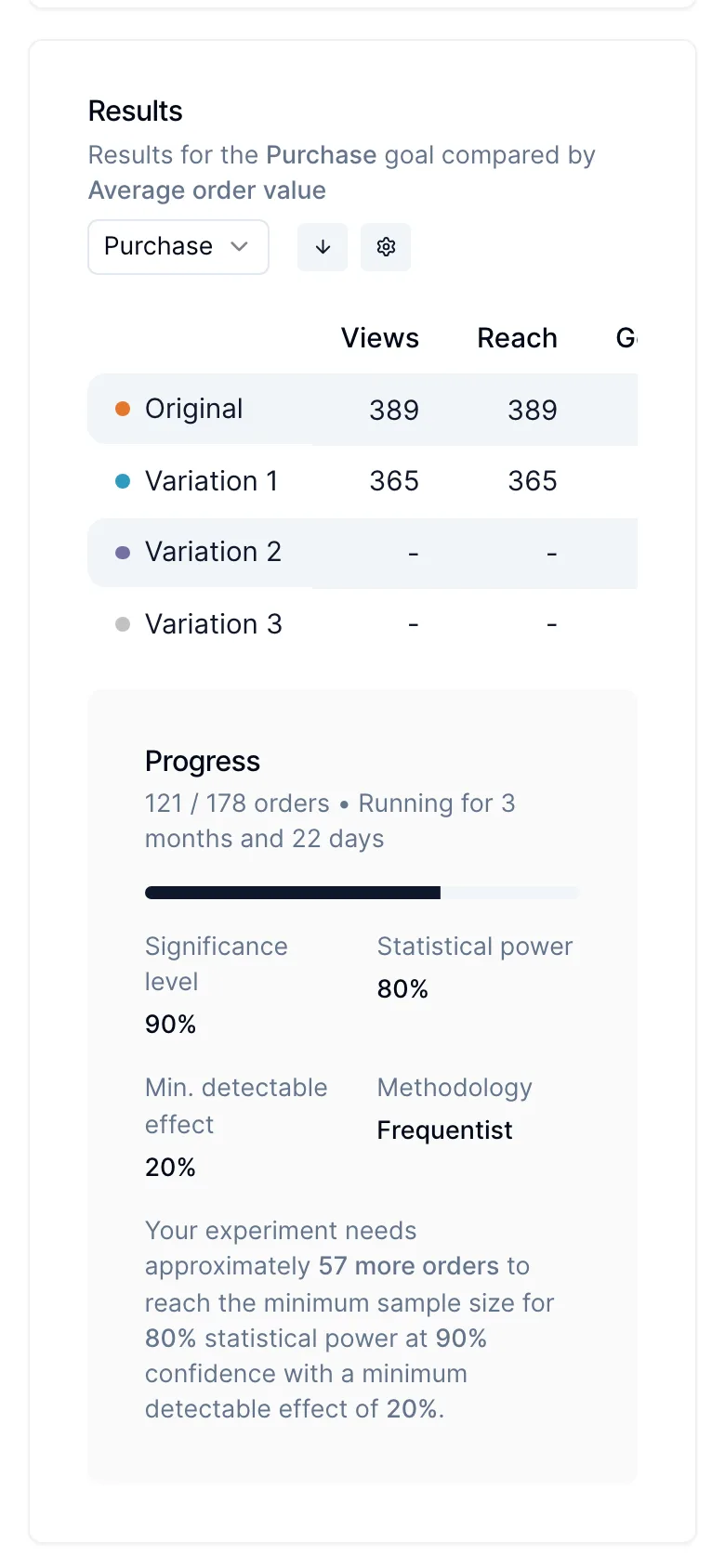
You can now see the revenue per visitor metric in your campaign and widget analytics. Switching to this metric also makes the significance and improvement metrics be calculated according to revenue as opposed to the single conversion rate metric rate that was available previously.

August 2023

March 2023

Improvement

Parsers and the Data Parser Engine

Parsers and the Data Parser Engine

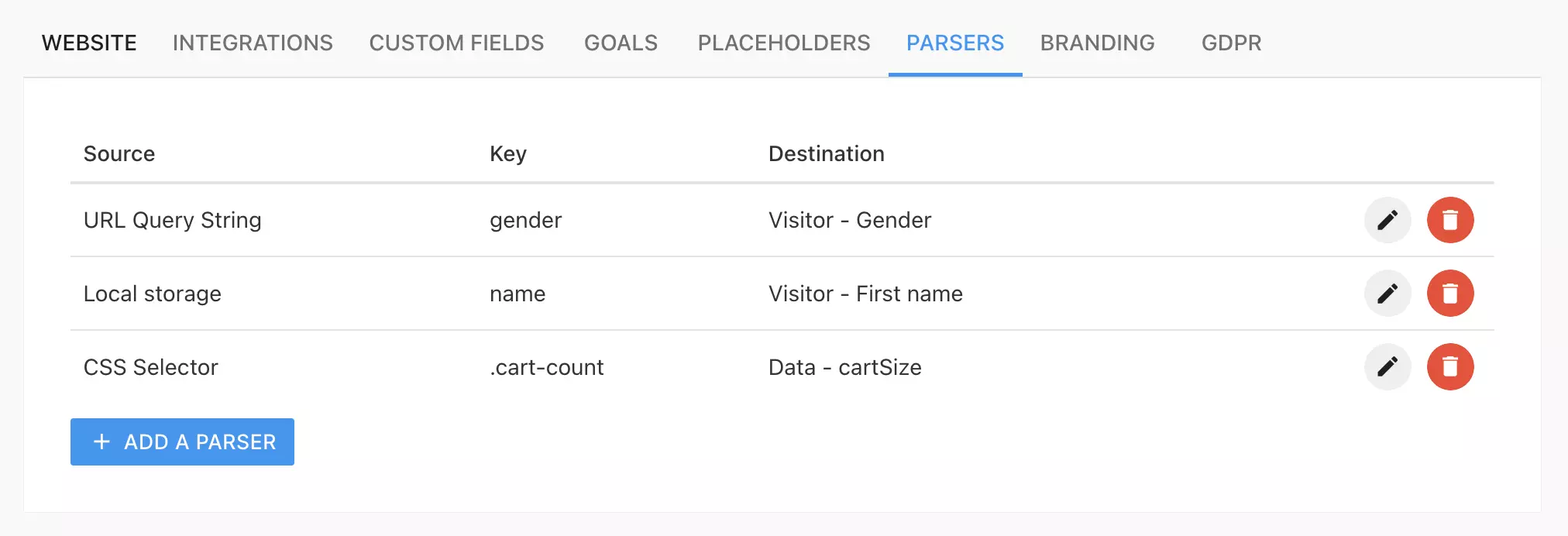
We're excited to announce data parsers. Data parsers are an extremely easy and robust way to parse data from your website to use in Personizely for targeting and personalization. Data parsers can parse data from 5 sources:

  1. Browser Local Storage - takes the value from the visitor's browser local storage and is the equivalent of calling localStorage.getItem(key)
  2. URL Query String - takes the value from the visitor's URL address. Example: https://site.com?name=Jim, where Jim can be parsed by using name as the source key.
  3. Cookies - takes the value from the visitor's cookies where the cookie name is the source key.
  4. CSS Selector - parses the inner text from an element from the page where the source key is a valid CSS selector used to find that element. Is the equivalent of calling document.querySelector(key).innerText.
  5. JS Variable - parses the value from a JS variable that should be available in the global context where the source key is the variable name (can also use don notation for accessing deeper nested values).

To learn more about data parsers please consult our docs.