New widget display options, rules, multiple triggers and more
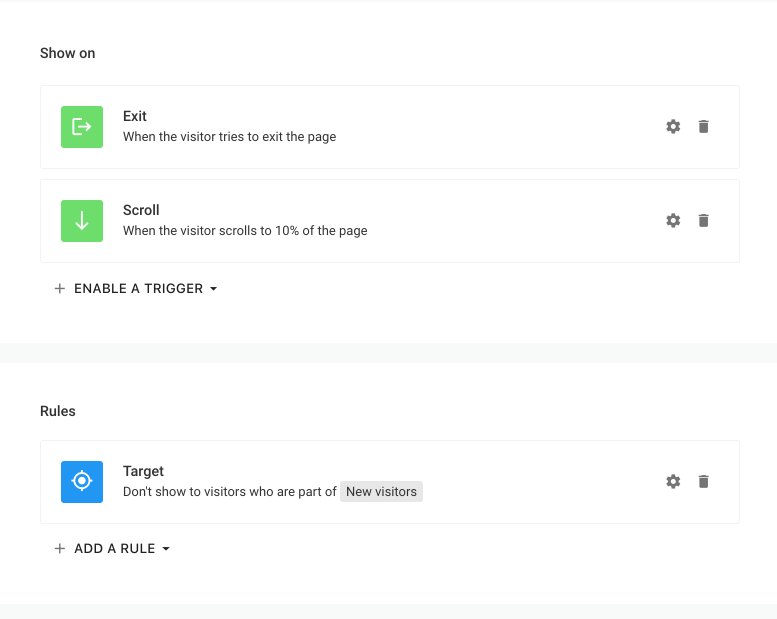
The widget Display Options were totally reworked to provide more flexibility in terms of triggers, targeting, and frequency options.
Triggers
- You can now use more than one trigger per widget, and it will show up once the first one was fired. This should help you build much more effective widgets.
- Exit intent now has the option to toggle on/off the mobile fallback by type. It should help if you like the scroll fallback but not the back button one.
- Conditions - you can now add conditions to your triggers, that are constraints that you put on each trigger. For example - if you don't want to show up an exit-intent widget if someone spent less than 10 seconds on the site, you can use a time condition. A scroll percent condition is also available.
Rules
Targeting, frequency, and page settings now all turned into rules which you can add/remove. The rules were given a revamp to give you more flexibility.
- Targeting - you can now also exclude visitors.
- Frequency - you can now pause/stop the widget based on multiple rules and not only one which was available previously. Also, you can now pause the widget for a specific amount of time - after a number of views which wasn't possible. The widget can also be paused for the duration of a session.
- A subdomains rule was added.
- Pages - a new wildcard option - a double asterisk (**) was introduced to match any element including a slash.
Note: The widget will only show up if all of the rule checks are passing.
Hide triggers
You can now specify hide triggers which will make the widget hide automatically on a scroll or after a delay if the visitor did not engage with the widget (i.e. focused on it).
Session concept
A session concept has been built to help you target visitors by understanding whether this is their first or not session and/or whether this is their first view during a session. Also, the First visit targeting filter was renamed to the First page view for more clarity, its behavior will remain the same but a new First visit filter was added to reflect a visit as a session. A session or a visit is considered once a tab of the website is opened and is tracked across all tabs of the same site until all tabs are closed, after that the session is considered closed and if the visitor opens the tab again, a new session is generated.
Show widget automation action
You can now make a form/button/image show a widget upon click. This is done using automation. If you select this option, it will ignore the widget's trigger and forcefully show the widget up. You also have the option to suppress the rules if any on the target widget, and if not used the widget might not show up if some rule checks are not passing.